If your team’s creative workflow is starting to feel more like creative chaos, you’re not alone. As campaigns grow more complex and content volume skyrockets, the tools used to manage feedback and approvals need to do more than just collect comments, they need to keep everyone aligned, secure, and moving fast.
That’s where Ziflow and PageProof come in. Both are online proofing platforms, but there are many differences in features, reliability, support and pricing. In this comparison, we’ll explore how Ziflow compares against PageProof in the areas that matter most: workflow automation, compliance, asset support, and scale, so you can decide which tool is right for your team’s creative workflow.
What we'll cover
Table of contents
TL;DR: Why Ziflow wins
- Advanced workflow automation: Multi-stage, conditional workflows that scale with your team (key capabilities not currently supported in PageProof).
- Built-in reliability: Ziflow delivers 99.99% uptime with published metrics; PageProof does not publish uptime data.
- Enterprise-ready compliance and scale: SOC 2 compliant and ISO 27001 certified with full audit trails, e-signatures, granular permissions, and 24/7 global support—trusted by creative and marketing teams at the world’s leading brands.
- AI-powered proofing: ReviewAI checks your proofs against custom checklists, suggests comments and markups, and provides a pass/fail result with rationale. Spend less time on tedious, manual reviews.
Compare features: Ziflow vs. PageProof
|
PageProof
 /5 (52 reviews) /5 (52 reviews) |
Reviews (Capterra) |  /5 (417 reviews)
 |
|
Includes standard markup and comparison tools for general creative review.
 |
Review and Markup |
Advanced markup tools including threaded comments, @mentions, frame-specific video review, safe-zone overlays, and version comparison—built to handle every asset type. |
|
Supports multiple file types, but approvals are managed per asset, which may limit campaign-level visibility.
 |
Multi-Asset Campaign Reviews |
Review any mix of assets in a campaign, including videos, images, websites, and more, in a single proof or individually. |
|
Auto-suggests markups on proofs using standard checks or custom rules. No AI-powered checklist reviews or pass/fail explanations.
|
AI Review |
ReviewAI checks proofs against your custom checklists, suggests comments and markups, and provides a pass/fail result with rationale. Improve the accuracy of each check with prompt testing and reliability scores. |
|
Offers version stacking and smart compare. Must manually lock proofs to prevent providing feedback on older versions.
|
Version Management |
Automatically tracks all versions with visual comparisons and full audit history. Prevents outdated feedback with auto-locking of older versions. |
|
Supports major file types, including documents, videos, audio files, and websites.
|
Media Types |
Supports 1,200+ file types including video, images, live and staged websites, audio, documents, HTML5, and more. |
|
Linear stages only—no conditional logic or parallel routing options.
|
Workflows & Review Stages |
Advanced workflow automation with parallel/sequential stages, logic-based routing, and SLA-based triggers. Scales easily across departments and projects. |
|
No published uptime metrics; some users have reported intermittent performance issues in reviews.
 |
Reliability - Product Uptime |
Delivers 99.99% uptime with a global infrastructure and published SLAs. Designed for high availability across large teams. |
|
No public intake form; asset submission is manual.
|
Intake Forms |
Custom-branded intake forms route uploaded files directly into workflows with required metadata. External and internal users supported. |
|
Reporting is bundled into a broader AI-insights suite with dashboard-level activity trends and proof-level detail.
|
Reporting |
Provides dashboards, usage insights, review analytics, and workflow bottleneck tracking—ideal for operational reporting and compliance. |
|
Digital signing at final approval, with re-authentication and an audit trail entry. ISO 27001:2022 certified. SOC 2 claimed at cloud-platform level rather than as their own audit. No stated support for FDA 21 CFR Part 11.
|
E-signatures & Compliance |
Authenticated e-signatures, credentials verified at signing, with a full audit trail on every proof. SOC 2 and ISO 27001 certified. Used by pharma, medical device, and food teams to support their FDA 21 CFR Part 11 compliance. |
|
Connects natively to Adobe Creative Cloud and Canva.
|
Creative Integrations |
Connects natively to Adobe Creative Cloud, Figma, and DaVinci Resolve, plus a direct API for custom integrations. |
|
Connects to project management tools, but may rely on Zapier or manual setups for workflows.
|
PM Integrations |
Connects natively to monday.com, ClickUp, Asana, Jira, Wrike, Slack, Teams, and Dropbox, with a direct API for custom integrations. Embedded in Monday.com and ClickUp. |
|
Offers plugins for core Adobe Creative Cloud apps, plus additional design and video tools.
|
Adobe Plugins |
Native plugins for Adobe Creative Cloud suite—InDesign, Photoshop, Illustrator, Premiere Pro, and After Effects—plus Final Cut Pro. |
|
Offers checklists, but limits to 1 checklist per proof and comments cannot be assigned to specific checklist items. Does not offer AI-powered checklists.
|
Checklists |
Offers customizable checklists to help reviewers stay consistent and compliant. Assign up to 10 checklists per stage. Offers AI-powered checklists with pass/fail rationale. |
Workflow & Automation
Ziflow offers fully automated, multi-stage workflows with support for conditional logic, parallel reviews, and dynamic routing, ideal for teams managing complex, high-volume campaigns. PageProof supports linear workflows that work well for smaller teams and simpler processes, but currently doesn’t offer conditional logic or parallel routing. Reviews typically move stage-by-stage, and features like automatic triggers or out-of-office handoffs are more limited; something to consider for fast-paced or highly structured environments.
Collaboration Experience
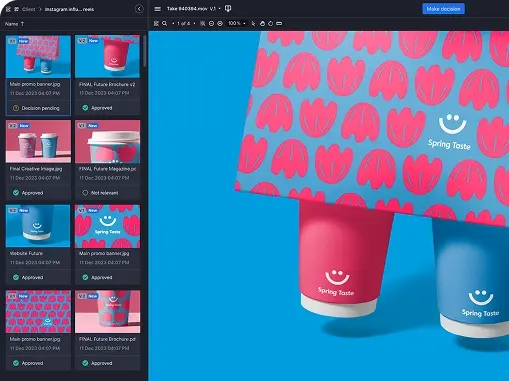
Both platforms support real-time commenting and markup, but Ziflow goes further with threaded replies, @mentions, side-by-side version comparison, frame-specific video review, and full context for every decision made. PageProof’s interface is praised for its simplicity, but we’ve seen users frequently cite frustration with slow loading times, limited dashboard organization, and difficulty navigating large volumes of feedback, especially on enterprise-sized projects.
AI-Powered Proofing
Ziflow’s ReviewAI automates checklist reviews so stakeholders can focus on judgment calls rather than manual checks. Teams define their requirements (brand guidelines, legal disclaimers, or mandatory creative elements) and ReviewAI evaluates each asset against those criteria, returning a pass/fail result with an explanation, suggested comments, and markups. Teams can also test criteria across existing proofs and track a reliability score before running checks at scale. Human reviewers always stay in control, verifying or overriding every result.
PageProof also flags potential issues through suggested markups and comments, but does not provide structured pass/fail results, reliability scoring, or a way to test check accuracy. Reviewers must interpret each flag and make the judgment call themselves. If your team manages high-volume reviews against consistent brand or compliance standards, Ziflow helps standardize and scale the judgment process itself.
AI Pricing
Both platforms use credits to power their AI features, but Ziflow keeps it simple: pricing is based on checks, and it works the same way every time. Short proofs cost a fraction of a credit per check, and longer proofs scale in straightforward, predictable steps. That means you can always estimate your credit needs ahead of time, with no cost surprises as your proofs grow.
Compare that to PageProof’s credit usage, which varies based on several factors, including file size, number of pages, data analyzed, complexity, and more. Credits are shared across multiple AI features, which can make it difficult to keep up with which activities are consuming credits and how quickly they’ll be used. With Ziflow's fixed formula, you always know what a check will cost and how far your credits will go.
The pricing above applies to static proofs only. Need ReviewAI for video proofs? Contact us to learn more.
System Reliability
When it comes to uptime, Ziflow leads with 99.99% availability, backed by published metrics and global infrastructure. Creative teams can count on a stable, always-on review process. PageProof does not currently publish uptime metrics. While many customers use the platform successfully, some public reviews reference lag or performance issues, particularly when working with large files or running high-volume campaigns.
Compliance, Security, & Control
Ziflow is built for regulated industries, offering SOC 2 compliance, ISO/IEC 27001 certification, electronic signatures, granular role-based permissions, and detailed audit trails. Ziflow is used by pharma, medical device, and food teams to support FDA 21 CFR Part 11 compliance, providing the security and controls needed for formal review and sign-off processes. Its security model is based on widely adopted enterprise standards.
PageProof emphasizes security through its proprietary “triple-layer encryption” model, which may appeal to teams seeking a simplified approach. However, PageProof currently lacks certain enterprise-level compliance features and SOC 2 is claimed at the cloud-platform level, rather than as its own audit. This may limit its suitability for larger organizations with formal review and sign-off processes and stricter security requirements.
Integration Ecosystem
Ziflow integrates deeply with tools creative teams already use, including Adobe Creative Cloud, monday.com, ClickUp, Slack, Asana, Dropbox, Figma, DaVinci Resolve, and more—plus robust API and webhook support for custom workflows. PageProof offers many of the same integrations but often relies on Zapier or webhooks alone.
monday.com Partnership
Ziflow is the official online proofing partner of monday.com, offering a deep, native integration that lets teams create proofs, trigger reviews, and sync status updates directly within monday boards. PageProof also supports monday.com connections, though in more complex integration scenarios, teams may need to rely on Zapier or manual configuration to achieve similar outcomes. For teams using monday.com to manage creative projects, Ziflow delivers a seamless, scalable proofing experience without the friction.
ClickUp Integration
Ziflow is embedded into ClickUp so proofs can be created, reviewed, and approved directly inside the ClickUp task itself, with no need to switch tabs. PageProof's ClickUp connection, by contrast, links out from the ClickUp item to a separate PageProof tab for review, with proof status mirrored back via custom fields. Overall, Ziflow offers a more integrated review experience for teams that want to manage review and approval without leaving ClickUp.
Scalability & Support
Ziflow is enterprise-ready by design, with proven performance at organizations managing thousands of assets and reviewers. It includes 24/7 global support, a dedicated customer success team for enterprise customers, and scalable user and storage options. PageProof serves mostly small to midsize teams, and its limited global headcount and time zone coverage can make enterprise support feel out of reach. Customers also cite lack of advanced onboarding or account management for larger rollouts.
What Ziflow customers who switched from PageProof are saying
“I found Ziflow to be much better than PageProof in several ways. The tools available for making comments and edits are more intuitive and there is a greater variety of tools and the version control features worked much better as well. Also their customer service was far better when it was necessary to interact with the company.”
“We had a subscription to PageProof a few years ago and its feature set at the time wasn't comparable to Ziflow. We moved on from PageProof after just a short time to Ziflow and have never looked back.”
“For our purposes, Ziflow had the right balance of customisation, security and ease-of-use. Some of the others appeared robust, but did not deliver the user-experience, with very slow load times for some files, or did not allow for saved workflows, which would mean content creators would have to manually add a long list of reviewers each time they created a proof.
I would like to give an honourable mention to PageProof, which offers a very clean and minimalistic experience, but lacked some of the more advanced features we were looking for.”
Why switch to Ziflow?
Creative teams often choose Ziflow when their content review needs outgrow the capabilities of more basic proofing tools. While PageProof can work well for smaller teams or straightforward workflows, many teams find that as their volume, complexity, or compliance requirements grow, they need more flexibility and control.
Ziflow addresses these with better proofing features, proven uptime, global support, detailed audit logs, and flexible workflows.
If your team is growing—or if you're tired of making do with limited functionality—Ziflow is the upgrade your review process needs.
Ziflow vs. PageProof FAQs
What is the difference between Ziflow and PageProof?
Ziflow is a purpose-built enterprise online proofing platform designed to handle high volumes of creative content with advanced workflow automation, asset flexibility, and integrations. PageProof is more suitable for smaller teams with basic review needs. While both support markup and commenting, Ziflow offers deeper automation, broader file support, and more robust enterprise-grade features like audit trails and 99.99% uptime.
Does Ziflow have better uptime than PageProof?
Yes. Ziflow maintains a documented 99.99% uptime and publishes service status transparently. PageProof does not share uptime statistics, and users have reported frequent lag, crashes, and outages—especially during high-volume usage.
Does Ziflow integrate better with monday.com than PageProof?
Ziflow is the official online proofing partner of monday.com, offering a native, tightly integrated experience for creative and marketing teams. Since teaming up with Ziflow, monday.com has prioritized deeper integration capabilities, allowing users to create, route, and manage proofs directly from their monday.com boards.
Can Ziflow replace PageProof for email or packaging proofing?
Yes—with added benefits. While PageProof promotes niche features like email campaign previews and barcode detection, Ziflow offers broader support for multi-asset campaigns, high-res packaging files, and structured approval flows that include legal, compliance, and external partners.
Which proofing tool is easier to use: Ziflow or PageProof?
PageProof is often praised for its simplicity in smaller teams. However, Ziflow balances ease of use with flexibility—providing an intuitive UI for everyday reviewers and robust configuration for power users who manage complex workflows.
Is PageProof cheaper than Ziflow?
PageProof’s Team and Team Plus plans are priced similarly to Ziflow’s Standard and Pro tiers. However, when it comes to enterprise pricing, PageProof tends to be cheaper—but with noticeable trade-offs. Its lower-cost plans come with limitations in automation, file type support, reliability, and integration depth. For teams that need enterprise-grade features like customizable workflows, advanced compliance, and 24/7 global support, Ziflow delivers more value—even if the upfront cost is slightly higher.
While PageProof claims to lead the market, the data tells a more nuanced story. Between October 2024 and June 2025, 67% of the features listed in their release notes aligned with functionality Ziflow had already introduced. Ziflow consistently sets the pace with innovations like campaign-based review, customizable intake forms, automated workflows, and advanced compliance tools. If you're looking for a platform that doesn't "lead from behind," Ziflow is your online proofing solution.
Final verdict: should you choose Ziflow or PageProof?
If your team is managing high volumes of creative content, working across multiple asset types, or needs a scalable and auditable review process—Ziflow is the clear choice.
While PageProof may have lower pricing for some packages and can work for small teams with simple workflows, it struggles with performance issues, lacks automation, and doesn’t offer the enterprise-grade control or reliability required for complex operations. Customers frequently cite crashes, slow file handling, and limited workflow flexibility as deal-breakers.
Ziflow, on the other hand, delivers:
- Advanced workflow automation that reduces review cycles and increases speed to market
- Support for 1,200+ file types, including video, websites, and rich media
- 99.99% uptime and published service metrics for peace of mind
- Robust security and compliance features, including SOC 2, audit trails, and e-signatures
- Seamless integrations with the tools your team already uses
- Global 24/7 support from a team that truly understands creative ops
If you need only basic markup capabilities, PageProof can work for you. But if you need a system that keeps projects moving, connects with your workflow, and scales with more complex workflows; you need Ziflow.



With a track record that spans media giants like WarnerMedia, Viacom, and Google, Aaron's expertise shines through in multi-million dollar projects across various mediums, from traditional television to the dynamic realm of YouTube.